MCP Server Setup
Connect cannabis market data directly to AI assistants using the CannMenus MCP server.
MCP tool calls are metered as API usage alongside REST calls and share your organization's rate limit. Monitor your usage on the API Dashboard.
What is MCP?
The Model Context Protocol (MCP) is an open standard that lets AI assistants access external data sources and tools. The CannMenus MCP server gives AI tools direct access to cannabis product data, brand analytics, pricing, stock status, and more — without writing any code.
Prerequisites
- A CannMenus Pro or API subscription
- An active API token (generate one from your API Dashboard)
- An MCP-compatible AI client (Claude, Cursor, Windsurf, etc.)
Setup
Claude Desktop
Add the following to your Claude Desktop configuration file:
- macOS:
~/Library/Application Support/Claude/claude_desktop_config.json - Windows:
%APPDATA%\Claude\claude_desktop_config.json
{
  "mcpServers": {
    "cannmenus": {
      "type": "url",
      "url": "https://api.cannmenus.com/mcp/",
      "headers": {
        "Authorization": "Bearer YOUR_API_TOKEN"
      }
    }
  }
}
Restart Claude Desktop after saving.
Claude Code (CLI)
Add to your project or global settings at .claude/settings.json:
{
  "mcpServers": {
    "cannmenus": {
      "type": "url",
      "url": "https://api.cannmenus.com/mcp/",
      "headers": {
        "Authorization": "Bearer YOUR_API_TOKEN"
      }
    }
  }
}
Claude.ai (Web)
Claude.ai supports OAuth authentication. Simply add https://api.cannmenus.com/mcp/ as the URL — no token needed. You'll be redirected to log in and authorize access.
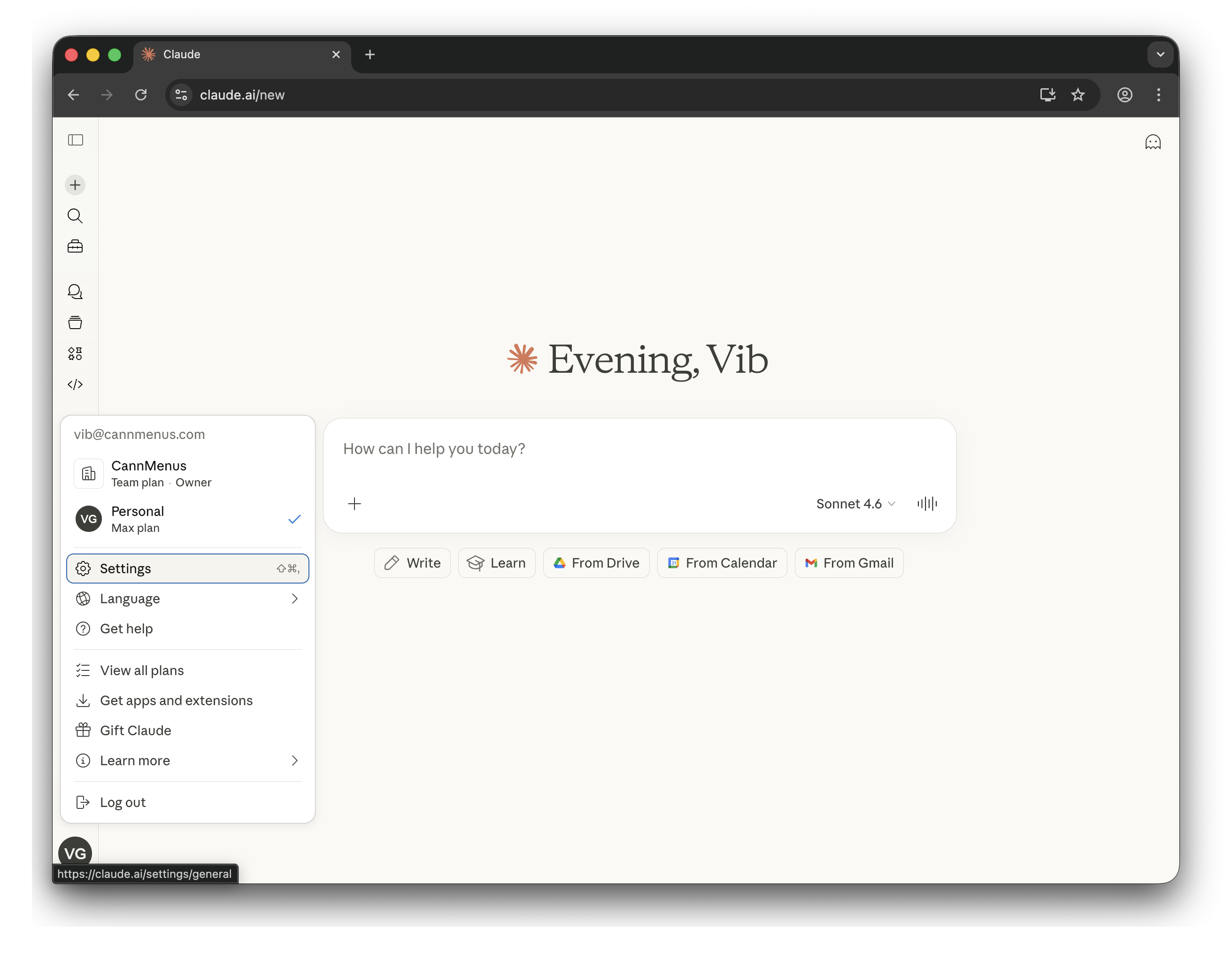
Step 1. Click your profile icon in the bottom-left corner, then click Settings.
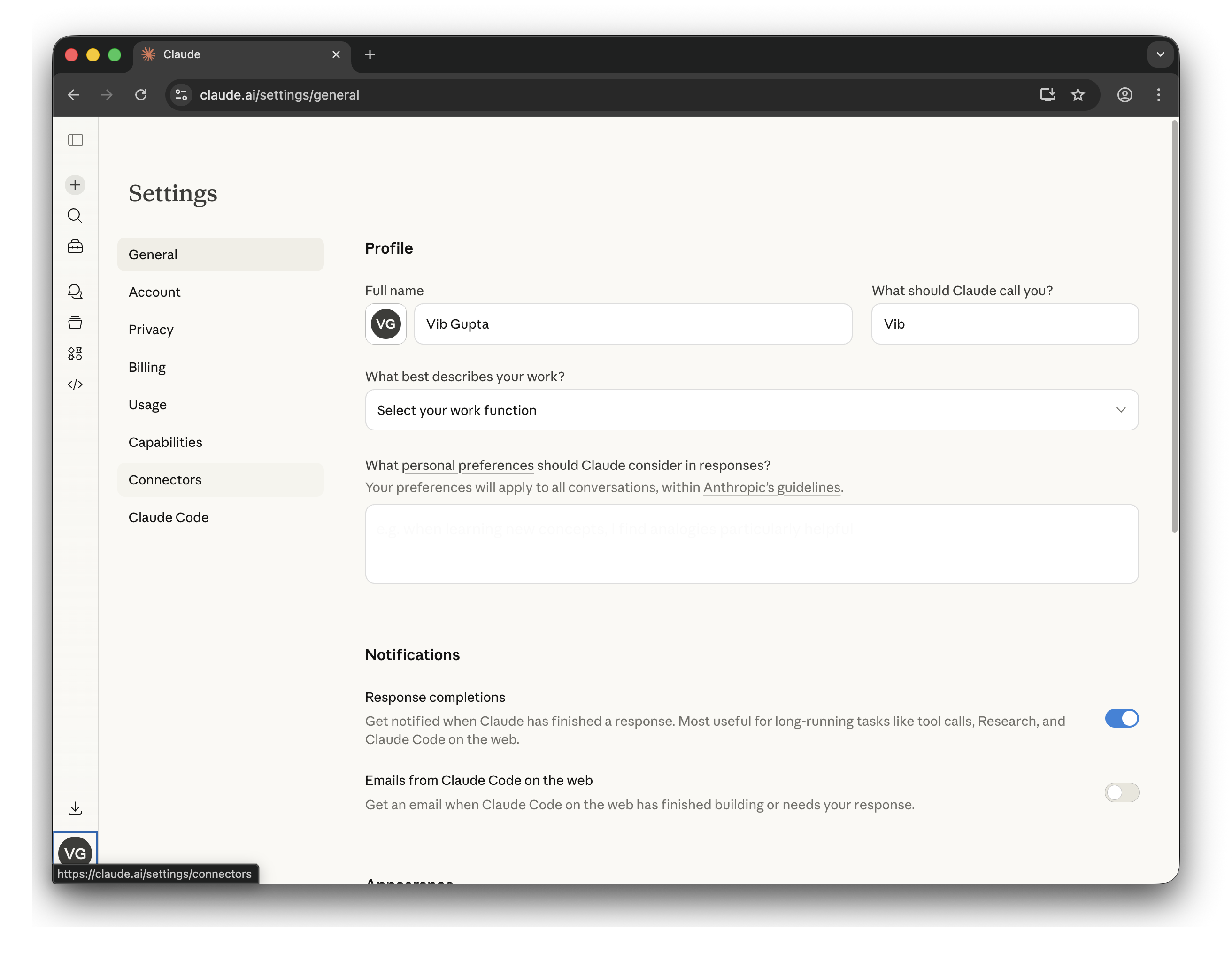
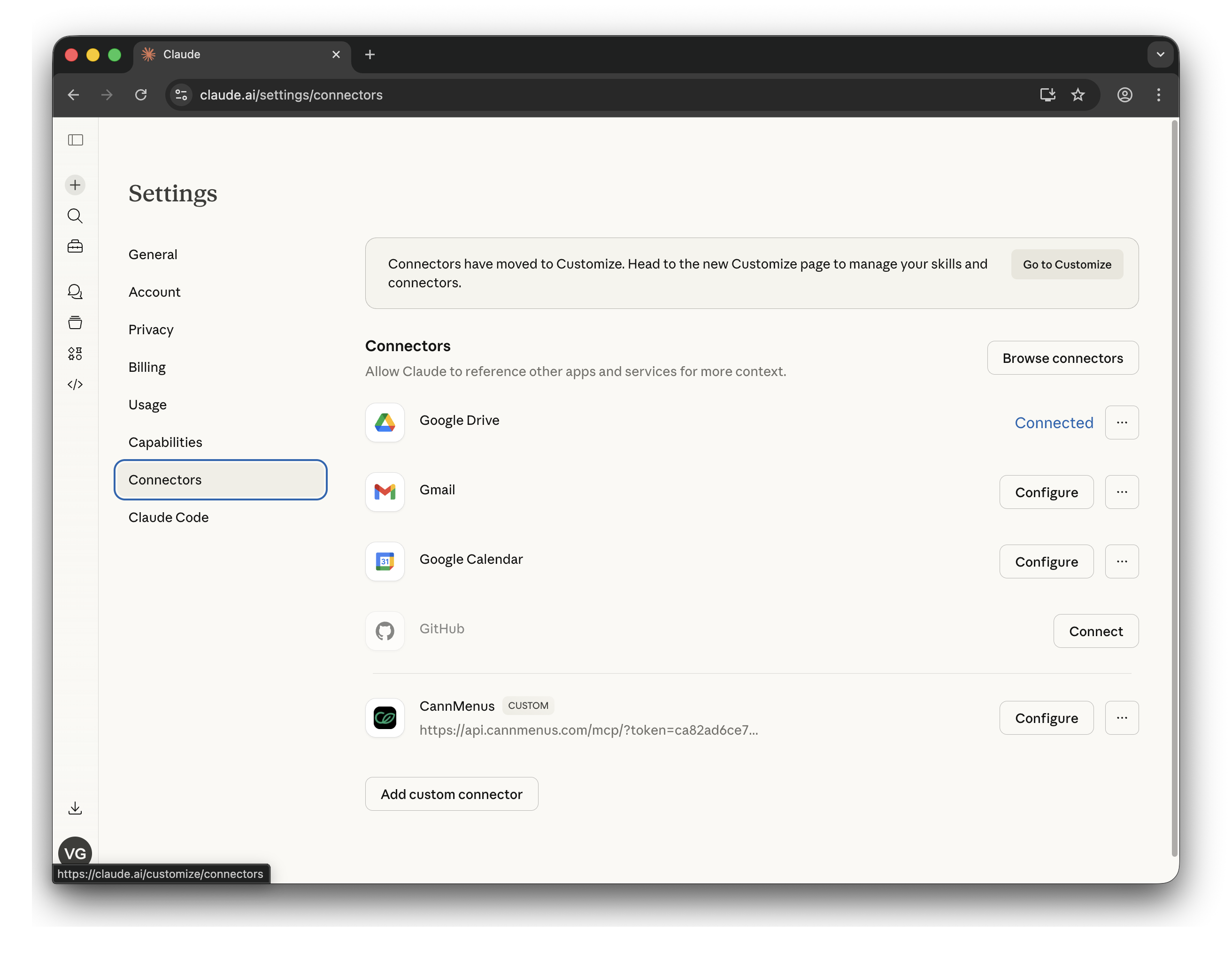
Step 2. In the Settings sidebar, click Connectors.
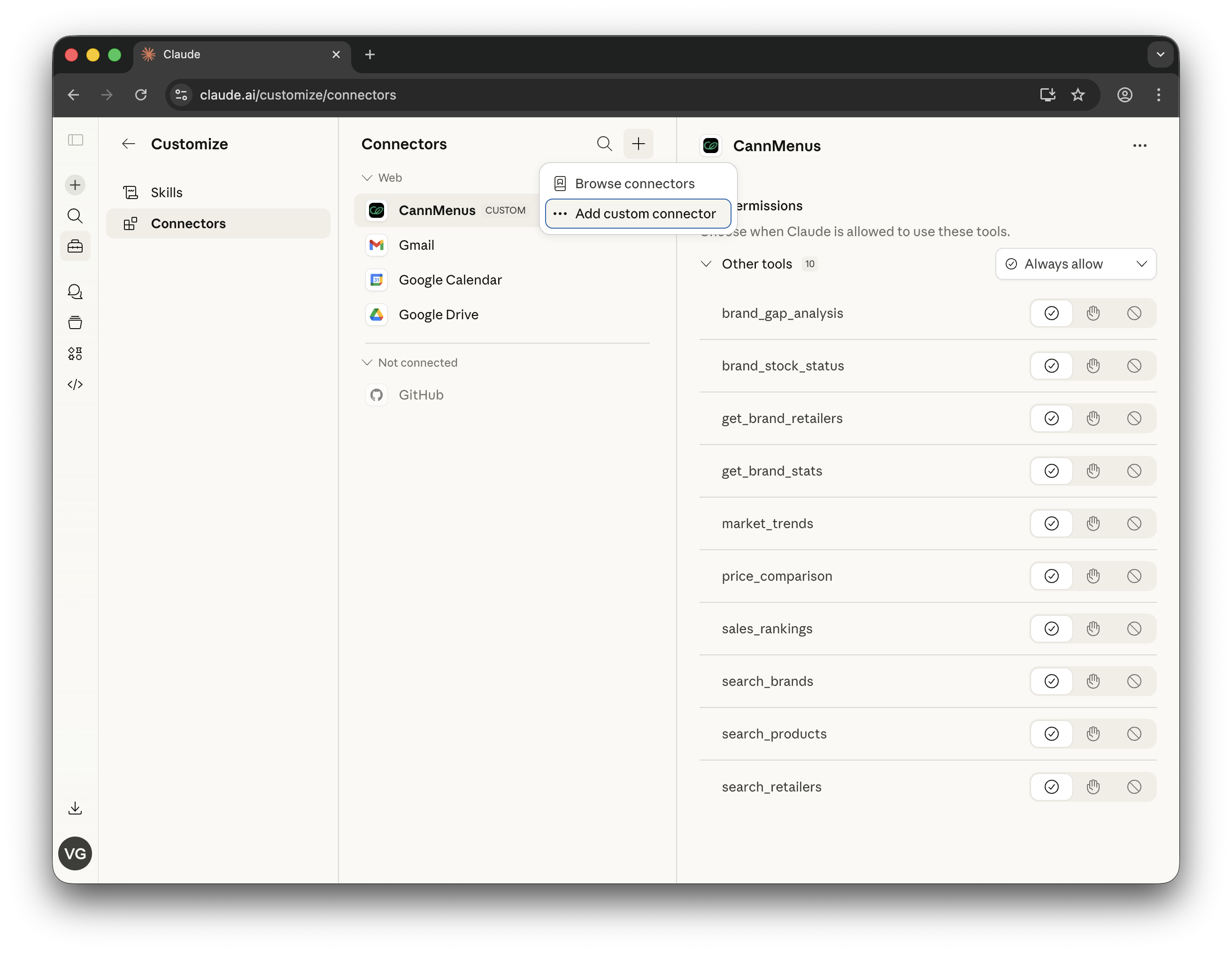
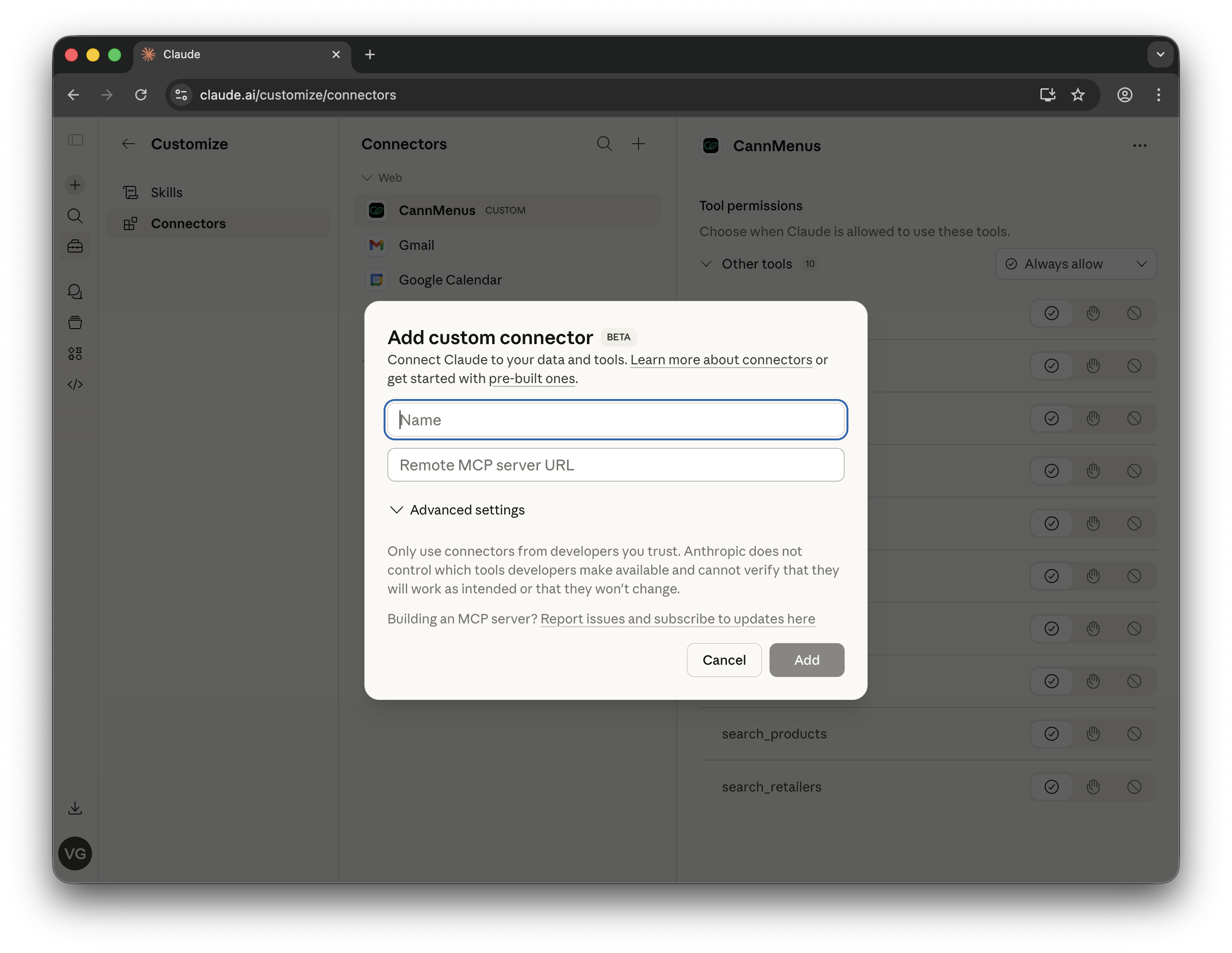
Step 3. Click the + button and select Add custom connector.
Step 4. In the dialog, enter CannMenus as the name and paste the MCP server URL:
https://api.cannmenus.com/mcp/
Click Add. You'll be redirected to CannMenus to log in and authorize access.
Step 5. Once connected, CannMenus will appear in your connectors list, and the tools your plan includes will be available to Claude.
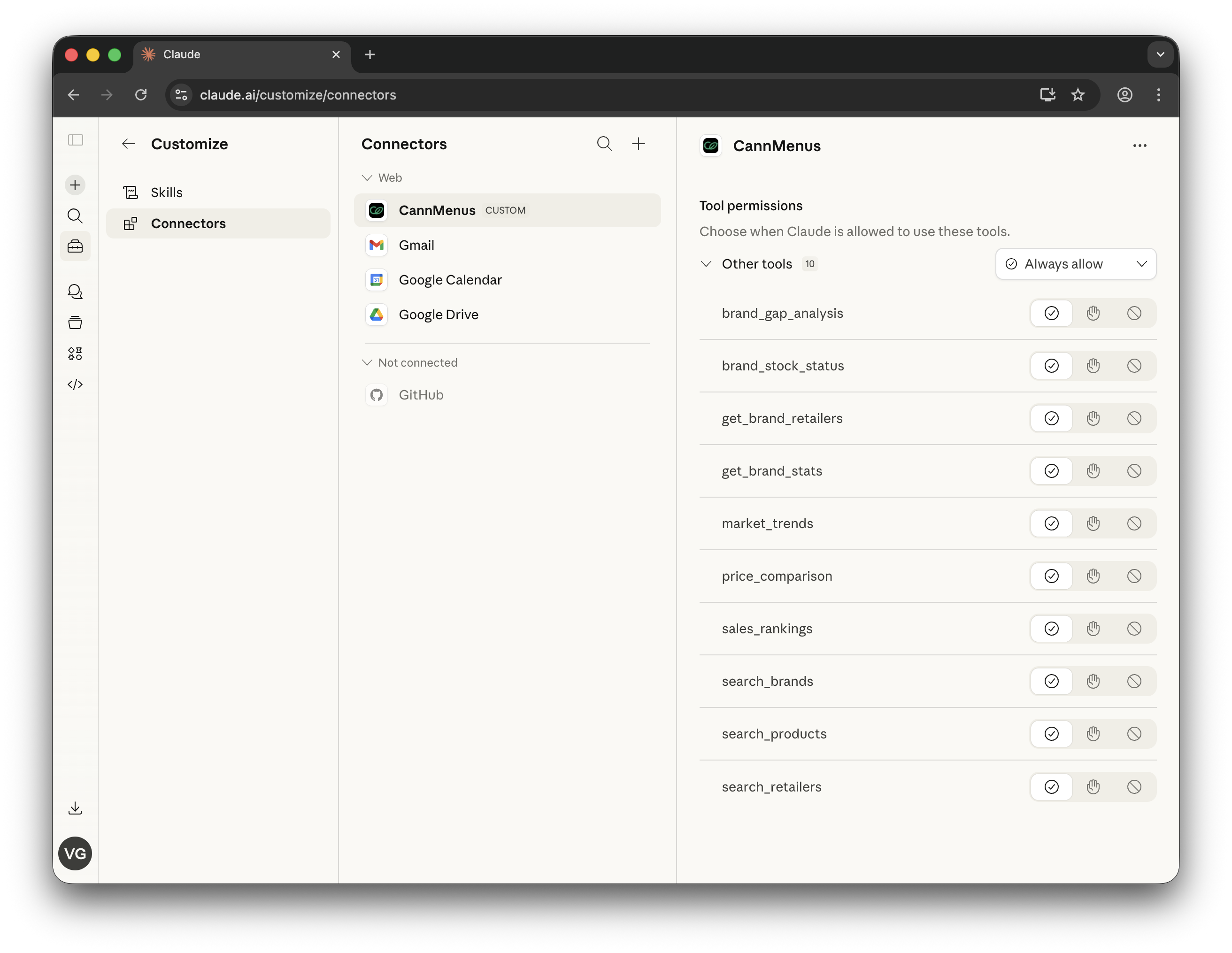
You can manage tool permissions from the Customize > Connectors page:
Cursor
Open Settings > MCP Servers and add a new server:
{
  "name": "cannmenus",
  "type": "url",
  "url": "https://api.cannmenus.com/mcp/",
  "headers": {
    "Authorization": "Bearer YOUR_API_TOKEN"
  }
}
Windsurf
Add to your Windsurf MCP configuration:
{
  "mcpServers": {
    "cannmenus": {
      "serverUrl": "https://api.cannmenus.com/mcp/",
      "headers": {
        "Authorization": "Bearer YOUR_API_TOKEN"
      }
    }
  }
}
Other MCP Clients
Any MCP-compatible client that supports the Streamable HTTP transport can connect. Use:
- Server URL:
https://api.cannmenus.com/mcp/— combined endpoint, auto-filtered to your entitlements - Authentication: Pass your API token via
Authorization: Bearer YOUR_API_TOKENheader or append?token=YOUR_API_TOKENas a query parameter
Product-scoped endpoints
If you want to narrow the LLM's tool surface to one product area, use a scoped URL instead of /mcp/:
| Endpoint | Tool set | Requires |
|---|---|---|
https://api.cannmenus.com/mcp/cannabis | Cannabis menu / stock / sales / company tools | cmp_permissions entitlement |
https://api.cannmenus.com/mcp/bevalc | Beverage / alcohol retail analytics | HEMP_BEVERAGE_DATA subscription |
https://api.cannmenus.com/mcp/wholesale | Wholesale account / order / pricing tools | WHOLESYNC subscription |
The combined /mcp/ endpoint already filters down to whatever you're entitled to, so a bevalc-only customer hitting /mcp/ and /mcp/bevalc see the same list. The scoped URLs are most useful for cross-sell customers who want a focused single-domain assistant.
Available Tools
The MCP server provides tools for cannabis, beverage/alcohol, and wholesale market data. The list returned by tools/list is filtered to your plan's entitlements, so you may see a subset of the tools below. Call whoami to see which product areas and states your key covers.
Tool selection — pick the right tool, not a fan-out
Pick a single structured tool over loops or ad-hoc SQL. Common questions map to one tool:
| Question | Tool |
|---|---|
| "What does my key have access to? Which states?" | whoami |
| "Top N brands / categories / strains / retailers by sales" | sales_rankings (one call, NOT a per-brand loop) |
| "Sales / volume trend over time" | market_trends |
| "Where is brand X in stock right now?" | brand_stock_status |
| "Full scorecard for one brand" | brand_performance (NOT a chain of stock + trends + gap) |
| "Where is strain X sold?" | search_strains, then strain_stock_status |
| "How is strain X performing?" | search_strains, then strain_performance |
| "White-space retailers (carry competitors but not me)" | brand_gap_analysis |
| "A retailer's full menu" | get_retailer_menu |
| "Storefronts in a state with menu provider, SKU and brand counts" | dispensary_summary (one call, NOT a per-store menu loop) |
| "MSO ownership tree / subsidiary sales" | get_company_hierarchy |
| "Market concentration across MSOs" | get_company_market_share |
| "What deals is a store running?" | retail_menu_deals |
| "Which products are on special at a store?" | product_deals |
| "What deals did a store/brand run last week? / promo history / day-of-week promo patterns" | deal_history |
Looping brand_performance per brand to build a top-10 leaderboard is the most common
anti-pattern — sales_rankings returns the whole list in one call.
Account
| Tool | Description |
|---|---|
whoami | Your organization's entitlements (cannabis, beverage/alcohol, wholesale), covered states (covered_states), your own brands, and suggested starter prompts. Listed on the combined and product-scoped endpoints, whatever your plan. Call it first |
Product Discovery & Menu Analysis
| Tool | Description |
|---|---|
search_products | Search cannabis products by state, brand, category, price, potency |
get_retailer_menu | Full menu for a retailer. Pass include_all_menu_providers=true if the default count looks low (secondary providers like BreadStack/Leafly) |
search_retailers | Find dispensaries by location, name, services |
search_brands | Find brands and get brand IDs |
get_brand_stats | Brand portfolio and category mix |
get_brand_retailers | Which retailers carry a brand |
search_strains | Find strains by name prefix, brand, or state (20 per page). Returns strain_id and strain_name; pass the matched names to strain_stock_status or strain_performance |
dispensary_summary | Per-storefront stats for a state in one call: menu provider, active SKUs, distinct brands, units on hand, and last_updated (the most recent change to the store's product records, not a scrape schedule). detail="brand_category" returns storefront x brand x category SKU counts. Filter by city, menu_provider, retailer_ids |
search_products and get_retailer_menu return terpene profiles when you set include_terpenes: true. Add include_terpene_fallback: true to also fill listings without a profile of their own from another listing of the same product in the same state. Each row then has terpenes: the listing's five most concentrated terpenes in percent (0.95 means 0.95%, unlike the REST API's fractions), or null when no profile was found; a fallback fill is marked "source": "uuid_match". The response also includes a terpene_summary with counts of listings, listings with a profile, and fallback fills. Other MCP tools don't return terpenes. For full profiles as fractions, use the REST Products endpoint.
Cannabis Deals & Promotions
Deals are available through these MCP tools only; the REST API has no deals endpoint. To call them from your own backend, and for the rules that affect consumer apps, see Deals & Promotions.
| Tool | Description |
|---|---|
retail_menu_deals | Dispensary menu deals and promotions — sales, BOGOs, bundles, spend thresholds, cart discounts. Filter by state, city, dispensary_name_or_id, brand, menu_type, mechanic, scope, min_discount_pct; each deal includes the store, discount fields, active window, attributed product count, and up to 5 sample products |
product_deals | Products on special — two modes. Single store: pass dispensary_name_or_id (optional brand, product_search) for that store's on-special products with attached deal summaries. Cross-retailer: omit dispensary_name_or_id and pass state (required) plus city and/or brand for listings flagged on sale or linked to an active store deal, each tagged with its store name/city/state. Treat a row as marked down only when original_price is present and greater than current_price |
deal_history | PAST deal/promotion lifecycle (history begins 2026-07-15). Three modes: timeline (newest-first feed of deal_started / deal_ended / deal_changed events with the deal's title, mechanic, discount and store), day_of_week (deal starts aggregated by ISO day-of-week x mechanic — weekend vs weekday promo patterns), summary (per-deal runs: first_seen, ended_at, days_active, times_restarted, status). Requires a scope: dispensary_name_or_id, or state (optionally + city and/or brand); date_from/date_to are inclusive days. day_of_week and summary cover the last 90 days when you omit date_from. timeline leaves out deal_observed heartbeat rows unless you request them with event_types=["deal_observed"] |
Brand + location questions are ONE call, never a fan-out. "STIIIZY deals in Brooklyn" → product_deals(state="New York", city="Brooklyn", brand="STIIIZY") for the on-sale products, or retail_menu_deals(state="New York", city="Brooklyn", brand="STIIIZY") for the deal list. Don't call search_retailers for the city and then loop product_deals per store — the city/brand filters do it server-side in one call.
Four field semantics to know:
city— narrows to one city or borough, case-insensitive. Matches the store's listed city OR the city parsed from its address (NYC boroughs often differ between the two, so "Brooklyn" finds stores listed under "New York" too). Works on both deals tools, standalone or combined withstate/brand.brand— filters deals attributable to a brand: deals whose attributed products carry the brand, plus deals naming it in their title or deal text. Requires a state scope (state=, unless your plan is already state-restricted). For "What deals is STIIIZY running in New York?" passbrand="STIIIZY", state="New York"— don't page through the whole state and scan it yourself.product_dealsin cross-retailer mode likewise requiresstate=.discount_in_price—shelfmeans the discount is already reflected in the product's shelf price (current_price);cartmeans it's applied at checkout and not visible in shelf prices.min_discount_pct— only filters percent-off sales (mechanic=salewithdiscount_kind=percent). BOGO / bundle / spend-threshold / cart-discount deals are returned regardless, since their value can't be expressed as a single percent.
Store-name matching (dispensary_name_or_id) is token-based: every word you pass must match, but extra words in the store's official name are fine — "Ultra Health Sunland Park" finds "Ultra Health Dispensary Sunland Park".
(These are cannabis dispensary tools — for wine/spirits/beer markdowns at BevAlc retailers, use the bevalc retail_deals tool below.)
Cannabis Brand & Market Analytics
| Tool | Description |
|---|---|
brand_performance | NIQ-grade single-brand scorecard — weekly sales, L4W vs P4W comparison, distribution %, category breakdown in one call |
market_trends | Sales volume, pricing trends over time. Returns aggregates block with pre-truncation totals |
sales_rankings | Top brands, categories, subcategories, strains, products, or retailers by estimated sales (rank_by) |
brand_stock_status | Brand availability across retailers (ground truth) |
brand_gap_analysis | White-space distribution opportunities |
price_comparison | Product pricing across retailers |
get_product_events | Stock and price event history |
strain_performance | Single-strain scorecard for one state: weekly sales, L4W vs P4W, top brands making it, category breakdown, distribution |
strain_stock_status | Which retailers have a strain in stock vs out of stock (ground truth). Pass several spellings to combine them |
sell_through | Observed units sold, from day-over-day drops in on-hand inventory. Requires states plus a brand, retailer, or product; trailing days window (default 30, max 120) |
Company & MSO Analysis
| Tool | Description |
|---|---|
search_companies | Find MSOs, operators, brand houses |
get_company_hierarchy | Ownership trees with sales data |
get_company_market_share | Market concentration analysis |
Wholesale (requires WholeSync subscription)
| Tool | Description |
|---|---|
wholesale_accounts | Revenue by retail account |
wholesale_account_orders | Order line items |
wholesale_revenue_breakdown | Revenue by brand/sku/retailer/month |
wholesale_account_health | Recency, frequency, avg order value |
wholesale_top_products | Best-selling SKUs |
wholesale_discount_analysis | Discount and pricing concession analysis |
wholesale_account_pricing | Per-account pricing profile vs fleet average |
Bev/Alc Retail Analytics (requires subscription)
Panel: CannMenus BevAlc Panel v1 — Total Wine, Spec's, ABC Fine Wine, Binny's (677 stores / 31 states). Successful responses include a universe block with panel boundaries.
| Tool | Description |
|---|---|
bevalc_brand_performance | NIQ-grade single-brand scorecard — weekly series, L4W/P4W, category share, velocity |
bevalc_category_landscape | Top brands in a category with dollar/unit share + velocity per store per week |
bevalc_distribution_trend | Weekly distribution gains/losses — stores_carrying / added / dropped |
retail_brand_rankings | Top brands by estimated sales |
retail_brand_distribution | Brand presence across retail chains |
retail_store_inventory | Store-level inventory with current_price, original_price, discount_pct |
retail_price_trends | Pricing trends with price change counts |
retail_sales_velocity | Stock depletion velocity |
retail_category_overview | Category-level market overview |
retail_geographic_analysis | Geographic distribution analysis |
retail_deals | BevAlc products on markdown (original_price vs current_price) with discount % |
retail_price_spreads | Cross-retailer price arbitrage on canonical SKUs. Not available on state-limited plans |
retail_canonical_sku_compare | Price and availability across retailers for one canonical SKU (by sku_id or upc), or a brand's canonical SKUs (brand_name; cross_retailer_only=true keeps SKUs carried at 2+ retailers). Not available on state-limited plans |
Pass full state names ("New Jersey", "California") in tool arguments, not two-letter codes. Call whoami to see the states your key covers (covered_states), and use the reference resources to discover valid parameter values.
Pagination & Truncation
Listing tools return a pagination block. There are three modes — each tool uses one:
mode=page — page-numbered
Used by: search_brands, search_retailers, search_products, get_brand_retailers, search_strains, dispensary_summary.
Pass page=N to fetch the next page when has_more=true. Per-page sizes are tool-specific (20–200 rows).
"pagination": {
  "mode": "page",
  "page": 1,
  "per_page": 200,
  "returned_count": 200,
  "total_count": 1437,
  "has_more": true
}
mode=cursor — keyset pagination
Used by: get_product_events, get_retailer_menu, retail_menu_deals, product_deals, deal_history (timeline/summary modes; day_of_week is a bounded aggregation with no pagination).
Pass the returned next_cursor back as the cursor argument to fetch the next page. Page sizes: 100 events, 200 menu rows, 50 deals/deal-products/history rows (up to 200 via limit).
"pagination": {
  "mode": "cursor",
  "returned_count": 200,
  "has_more": true,
  "next_cursor": "eyJwIjoxLCJ2IjpbIkZsb3dlciIsIk51Z3oiLC..."
}
Don't loop blindly — most questions are answered by a single page. Only paginate when you genuinely need every row.
Cursor cap: cursor pagination is capped at 50 follow-up pages per hour per API token per tool. Only calls that pass cursor count; first-page calls don't. The counter resets at the top of each UTC hour. Hitting the cap returns this error inside the tool result (not an HTTP error):
{
  "error": "pagination_rate_limit",
  "message": "get_retailer_menu has fetched 51 pages this hour (limit: 50). Narrow your filters instead of paginating further, or wait until the next UTC hour...",
  "tool": "get_retailer_menu",
  "pages_fetched_this_hour": 51,
  "max_pages_per_hour": 50
}
If you hit it, narrow your filters (add category, event_type, retailer_id, city, etc.) — don't retry the same call in a loop. This cap is separate from your organization's HTTP 429 rate limit (see Troubleshooting).
Per-page summaries in get_product_events: event_summary and total_events cover the current page only, not the full timeline. Don't sum them across cursor calls.
mode=split — capped rows + aggregates
Used by: market_trends, brand_stock_status, price_comparison, brand_gap_analysis, strain_stock_status, bevalc_category_landscape.
These tools cap row output but return an aggregates block computed from the full un-truncated set. For market figures use aggregates.* — never sum rows[] when truncated=true. These tools do not (yet) support cursor pagination — narrow filters if you need more rows.
"pagination": {
  "mode": "split",
  "returned_count": 5000,
  "has_more": false,
  "truncated": true,
  "total_count": 12453,
  "cap_applied": 5000
},
"aggregates": {
  "total_estimated_sales": 4823901.50,
  "total_estimated_units": 142318,
  ...
}
Pricing Fields
Product-level tools return current_price (shelf price) and original_price (list/MSRP, may be NULL if unavailable). When both are present and original_price > current_price, the product is on promotion — compute discount_pct = (original_price - current_price) / original_price * 100. Never assume a product is discounted when original_price is NULL — it means we don't know the list price.
Reference Resources
The MCP server also exposes reference resources that help AI assistants discover valid parameter values:
| Resource | URI | Description |
|---|---|---|
| States | cann://reference/states | List of all supported US states |
| Categories | cann://reference/categories | Valid product categories |
| Tags | cann://reference/tags | Available product tags (effects, flavors, etc.) |
| Brands by State | cann://reference/brands/{state} | All brand names and IDs in a state |
Usage and Billing
MCP tool calls are metered as API usage alongside REST calls and share your organization's rate limit. See our Pricing page for current plans.
Monitor your usage on the API Dashboard. Per-token request counts and last-used dates are displayed so you can track MCP usage separately from direct API calls.
Tip: Use a dedicated API token for MCP so you can track its usage independently from your other integrations.
Example Conversations
Once connected, you can ask your AI assistant questions like:
- "What are the best-selling flower brands in California?" →
brand_performanceorsales_rankings - "How is STIIIZY doing in California?" →
brand_performance(weekly sales, distribution, L4W/P4W) - "Compare pricing for Jeeter products across dispensaries in Colorado" →
price_comparison - "Which dispensaries in Arizona don't carry Raw Garden but carry similar brands?" →
brand_gap_analysis - "What deals is Sunnyside Chicago running today?" →
retail_menu_deals - "What deals is STIIIZY running in New York?" →
retail_menu_dealswithbrand="STIIIZY", state="New York" - "Pull retailer menus with deals on STIIIZY products in Brooklyn" →
product_deals(state="New York", city="Brooklyn", brand="STIIIZY")orretail_menu_dealswith the samestate/city/brand— one call, not a per-store loop - "Which products are on special at The Fire Station in Iron River?" →
product_deals - "What deals did Sunnyside Chicago run last week?" →
deal_historywithdispensary_name_or_id,date_from/date_to(history begins 2026-07-15) - "Do Michigan dispensaries run more BOGOs on weekends or weekdays?" →
deal_history(state="Michigan", mode="day_of_week") - "How long has that promo been running, and does it restart every week?" →
deal_history(mode="summary")for the store or brand - "What are the top spirits brands at Total Wine in Texas?" →
bevalc_category_landscape - "Show me Tito's distribution trend over the last 12 weeks" →
bevalc_distribution_trend - "How is Don Julio doing vs the spirits category?" →
bevalc_brand_performance
The AI assistant will automatically use the appropriate CannMenus tools to fetch current data and provide analysis. Menu and deal data is refreshed from dispensary menus periodically throughout the day; there is no guaranteed refresh interval.
Troubleshooting
"Authentication failed" — Verify your API token is active and correctly set in the Authorization: Bearer header (or ?token= query parameter). Generate a new token from the API Dashboard if needed.
"No results found" — Use full state names, such as "New Jersey", and valid category names. Use the reference resources to discover valid values.
A state access error — The state is not covered by your plan. Call whoami to see the states your key covers (covered_states).
"Rate limited" (HTTP 429) — Rate limits are set per organization, and REST and MCP calls share one budget. Wait the number of seconds in the Retry-After response header before retrying, and contact support if you need a higher limit.
pagination_rate_limit error in a tool result — This is the separate cursor cap (50 follow-up pages per hour per API token per tool), not the HTTP rate limit. Narrow your filters instead of paging further; don't retry the same call in a loop. The counter resets at the top of each UTC hour.